What is an idea parking lot? How to park ideas without losing focus
An idea parking lot is a separate place where you write down ideas that appear while you are working on something else. The idea is saved, so your mind can let go of it. Your attention returns to the current work, and you decide what to do with each idea later, at a review time you choose.
Capture the idea in one sentence the moment it appears. Do not start working on it.
Keep the parking lot out of sight while you work, so it does not pull at your attention.
Review ideas at a set time, one at a time, and make one decision for each.
Require evidence before an idea becomes work. Most ideas deserve to be discarded, and that is fine.
Why writing an idea down helps you stop thinking about it
Unfinished thoughts tend to keep resurfacing. An idea you have not dealt with nags at you during other work, which is why you can sit down to write a proposal and find yourself thinking about a new product instead.
Research supports a simple fix. In a series of experiments published in 2011 in the Journal of Personality and Social Psychology, unfinished goals caused intrusive thoughts during unrelated reading and hurt performance on another task. When participants made a specific plan for the unfinished goal, those effects disappeared, even though the goal itself was not finished yet. (Masicampo and Baumeister, 2011 (opens the source in a new tab))
There is an important detail. The studies tested making a specific plan, not simply dropping a thought into an inbox. An idea parking lot works when it comes with a plan: the idea has a place and a review time, so your mind can release it. A parking lot you never review is not a plan, which is why the review matters as much as the capture.
Where the term "parking lot" comes from
The phrase comes from meeting facilitation. When someone raises a topic that does not belong in the current discussion, the facilitator writes it on a flip chart labeled "parking lot." The meeting stays on track, and the topic is not lost. An idea parking lot applies the same move to your own attention.
How to use an idea parking lot well
Capture in one sentence. Write just enough to recognize the idea later. No planning, categories, or due dates at capture time.
Keep it out of sight while you work. Do not keep the list open next to your task, and avoid counters that show how many ideas are waiting. Unfinished work leaves attention residue that lowers performance on the task in front of you. (Leroy, 2009 (opens the source in a new tab))
Test urgent ideas quickly. Ask whether the idea protects revenue or prevents a loss today, whether your current work is actually blocked, and whether a real opportunity or deadline disappears before your review. If not, it waits. Deciding this rule in advance is a form of if-then planning, which research links to better goal attainment. (Gollwitzer and Sheeran, 2006 (opens the source in a new tab))
Review on a schedule. Pick a daily or weekly review time and keep it. Review should be a planned event, not a reaction.
Review one idea at a time. Looking at thirty ideas at once is overwhelming and invites new rabbit holes. One card, one decision.
Make one of three decisions. Act on it, keep it parked, or discard it. Acting should require evidence, not excitement.
Notice what keeps coming back. An idea that resurfaces several times is a signal. Give it a clear decision instead of parking it forever.
Idea parking lot vs to-do list, someday list, brain dump, and notes app
They all hold things you might do. The difference is when you look at them and what they protect.
Differences between an idea parking lot, a to-do list, a someday list, a brain dump, and a notes app
Kind of list
What goes in it
When you look at it
What it protects
Idea parking lot
Ideas that appeared while you worked on something else
At a scheduled review, one idea at a time
Your current priority from switching
To-do list
Tasks you already committed to
All day, while working
Your commitments from being forgotten
Someday list
Things you might do one day
Rarely
Long-term ideas from being lost
Brain dump
Everything on your mind, all at once
Right after writing it, to sort it
Your head from feeling full
Notes app
Anything, mixed together
Whenever you search for something
Information you want to keep
Free idea parking lot templates
If you prefer paper or a spreadsheet, copy the columns that fit your work into any document or sheet.
The basic template
Idea (one sentence) | When it appeared | Why it might matter now (evidence, if any) | Review decision: Act on It, Keep Parked, or Discard
For solo founders
Idea (one sentence) | Would it protect or grow revenue this month? | Who asked for it (customer evidence) | Review decision and date
Example: while writing a client proposal, "Launch a referral program" appears. No revenue at risk today, the proposal is not blocked, and nothing expires before Friday's review, so it is parked.
For creators and marketers
Content idea (one sentence) | Format (post, video, email) | Why now (audience question, trend, or deadline) | Review decision
Example: while editing this week's video, a new series idea appears. It is captured with its format and waits for Monday's content review.
For managers and meetings
Topic raised | Raised by | Owner if it becomes a task | Decide at (meeting or date) | Review decision
Example: a side topic comes up in the planning meeting. It goes on the parking lot with who raised it, and the agenda stays on track.
For idea-heavy work sessions
Idea (one sentence) | Time | Revenue today? Blocked? Deadline? (yes or no) | Parked or re-evaluated
When a parked idea should become a task, or your next priority
Does it still matter now that the excitement has faded? If not, discard it. That is the parking lot working.
Is there evidence behind it? A customer asked, revenue depends on it, or a real deadline is coming. If not, keep it parked or discard it.
Is it small enough to just do? Put it on your task list or calendar, like any other commitment.
Is it big enough to deserve your full focus? Line it up as your next priority, with a draft finish line, and start it only after the current priority is done.
In AI Focus Tool, Act on It lets you schedule the idea or mark it Ready, so it is suggested first when you choose your next priority. With the Focus Board module, Parked, Ready, and Done sit side by side, while your active priority stays in the Focus Space.
A simple review check: why it matters, what the evidence is, and what it would cost your current priority.
Common mistakes, and how to fix them
Mistake: working on the idea "just for a minute." Fix: capture it and return to your priority immediately. The minute is how afternoons disappear.
Mistake: keeping the list visible. Fix: hide it during focus. Even a count of waiting ideas tugs at your attention.
Mistake: never reviewing. Fix: schedule the review. An unreviewed parking lot turns into anxiety instead of relief.
Mistake: keeping everything forever. Fix: discard freely. Most ideas were only exciting in the moment they appeared.
How AI Focus Tool runs your idea parking lot for you
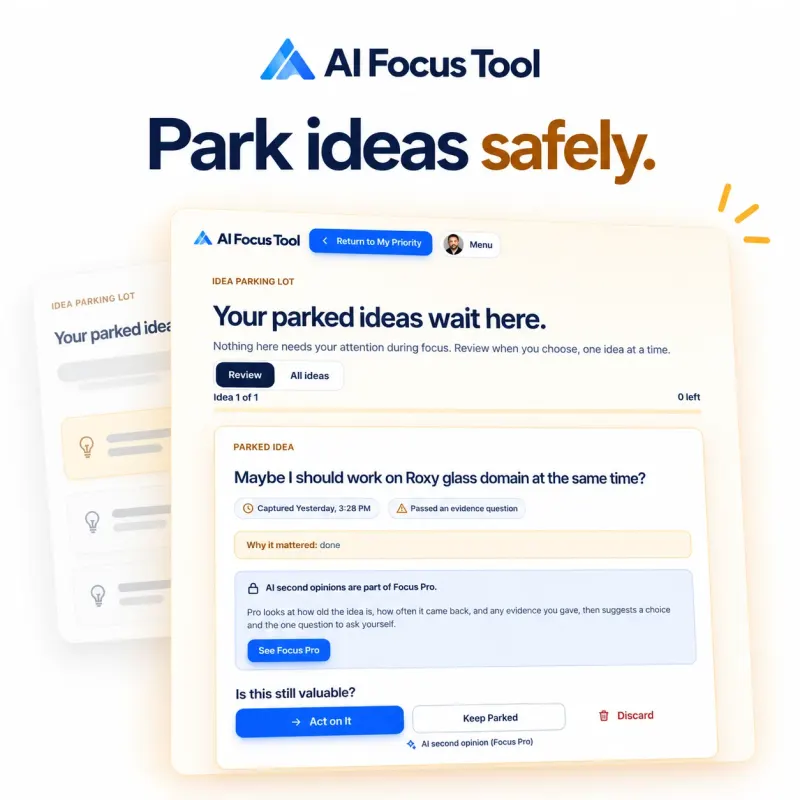
AI Focus Tool builds these habits into the product. When an idea appears, you tap New Idea Appeared, write one sentence, and answer three evidence questions in about 60 seconds. Ideas without evidence go to your Idea Parking Lot, which never appears on your focus screen and shows no count. At review time you see one card at a time, with how often the idea resurfaced and why it mattered, and you choose Act on It, Keep Parked, or Discard.
With Focus Pro, an AI second opinion helps during review. You still make every decision.
Idea parking lot questions
What is an idea parking lot?
An idea parking lot is a separate place where you write down ideas that come up while you are working on something else. Capturing the idea lets you stop holding it in your head, return to your current work, and decide what to do with it later at a planned review.
Where does the term "parking lot" come from?
The term comes from meeting facilitation. When a topic comes up that does not belong in the current discussion, the facilitator writes it on a flip chart labeled "parking lot" so the meeting can stay on track and the topic is not forgotten.
How is an idea parking lot different from a to-do list?
A to-do list holds tasks you already decided to do. An idea parking lot holds ideas you have not decided on yet. Keeping them separate stops untested ideas from sitting next to your real commitments and competing for your attention.
How often should I review my idea parking lot?
Review it at a regular time you choose, such as the end of each day or once a week. The point is that review happens on schedule instead of whenever an idea feels exciting. Many people find a weekly review keeps the list short and useful.
What should I do with ideas during review?
Make one decision per idea: act on it, keep it parked, or discard it. Acting on an idea should require a reason, such as evidence that it protects revenue or that customers asked for it. Discarding is healthy; most captured ideas were only interesting in the moment.
Can an idea parking lot help with shiny object syndrome?
Yes. Shiny object syndrome is the habit of chasing each new idea before finishing the current one. A parking lot gives every new idea a safe place to go, so you can capture it without chasing it, and decide later with a calmer mind.
What should I write down?
One sentence: enough to recognize the idea later. If you know why it might matter now, such as a customer request or a deadline, add that too. Skip plans, categories, and due dates at capture time.
How do I keep it from becoming another overwhelming list?
Keep it out of sight while you work, review one idea at a time on a schedule, and discard freely. A parking lot stays useful when most ideas leave it at review, either as a decision or in the trash.
What do I do with ideas that keep coming back?
Treat a returning idea as a signal. Give it a clear decision at the next review: act on it, give it a date, or discard it on purpose, instead of parking it again.
When should a parked idea become my next priority?
When it still matters after the excitement has faded and it has evidence behind it, such as revenue, a customer request, or a deadline. Line it up as your next priority, and start it only after the current priority reaches its finish line.
How does Focus Pro help with idea review?
Focus Pro brings the strongest ideas to the top of your review, sends review reminders at the time you choose, gives an AI second opinion during review, and keeps your full history. You still make every decision.
Park your next idea safely, in seconds.
Your ideas stay private in your workspace, and they never appear on your focus screen.
We use Google Analytics to learn which pages help people finish what matters. It never receives your priorities, ideas, name, or email, and it is never used for ads. How we use analytics